
myHARTING Login
Konfiguraattorit
产品
产品
工业用连接器 / Han
®
圆形连接器
板端连接器
工业以太网交换机
按钮开关
电动汽车充电设备
工具
定制化解决方案
电缆组件和散装电缆
myHARTING
下载/目录订购
下载/目录订购
Lataa PDF katalogi
Lataa tuotetiedot ePLAN
Lataa tuotetiedot Zuken E3series
Product Data Manager (only eng.)
维修服务
Add to Wishlist
Remove from wishlist
Matching Products
Matching Products
NEW
Combinables
3
Tools
1
饰品
3
no data available
eShop
工业用连接器 / Han
®
矩形连接器
...
上売/底座
用于恶劣环境条件
09 40 124 2332
Osanumero: 09 40 124 2332
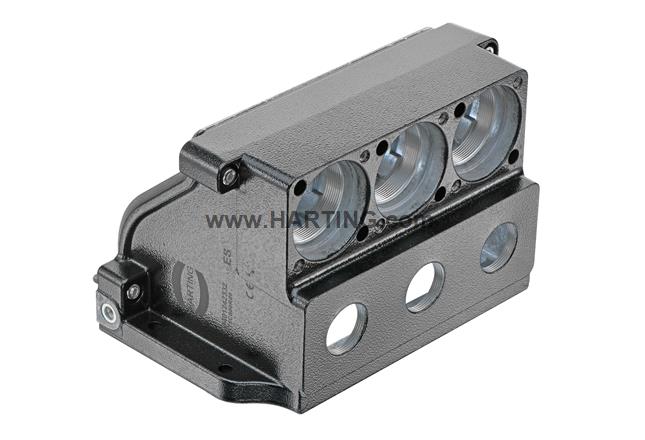
Han 24HPR VarioShell-HBMA-SCL-SP2-3xM32
Kuva on suuntaa antava, tarkista tuotteen kuvaus.
Properties Overview
不封底安装底座
弯式
尺寸: 24 HPR VS
螺钉锁扣
材料 (上壳/底座): 压铸铝, 防腐蚀
粉末涂层
RAL 9005(乌黑)
材料(密封件): NBR
Notes
Compare
Osanumero: 09 40 124 2332
Han 24HPR VarioShell-HBMA-SCL-SP2-3xM32
Notes
Compare
All functionalities, price and availability after
sign in
.
Add to Wishlist
Remove from wishlist
Distributors
E-Mail Inquiry
Matching Products
NEW
Combinables
3
Tools
1
饰品
3
no data available
Overview
Product Details
Downloads
Knowledge
Distributors
Product Details
Downloads
Knowledge
Distributors
tuotteen yksityiskohdat
标识
类别
上売/底座
上壳/底座系列
Han
®
HPR VarioShell
上壳/底座类型
不封底安装底座
上壳/底座介绍
弯式
版本
尺寸
24 HPR VS
VarioShell 层次 1
3x M32
VarioShell 层次 2
3x SP2
锁定类型
螺钉锁扣
应用领域
用于恶劣室外环境的上壳/底座
技术参数
拧紧力矩
12 Nm 安装框架
10 Nm 安装保护罩
12 Nm PE螺钉
3 Nm M6固定螺栓
极限温度
-40 ... +125 °C
关于极限温度的说明
用作符合 IEC 61984 标准的连接器。
防护等级符合 IEC 60529
IP66
IP67
IP68
IP69
材料特性
材料 (上壳/底座)
压铸铝
防腐蚀
表面(上壳/底座)
粉末涂层
颜色(上売/底座)
RAL 9005(乌黑)
材料(密封件)
NBR
规格和认证
规格
IEC 61984
IEC 61373 类别 1 B 级
认证
CE
商业数据
包装尺寸
1
净重
2,821.4 g
原产国
中国
欧洲海关关税号
85389099
GTIN
5713140571426
eCl@ss
27440202 长方形连接器的外壳
ETIM
EC000437
UNSPSC 24.0
39121466
Downloads
Download Package
Documentation
Data Sheet
Näytä tiedot
Piilota tiedot
Download Settings
PDF (Portuguese_PT)
PDF (捷克语)
PDF (丹麦语)
PDF (德语)
PDF (Spanish_MX)
PDF (英语)
PDF (西班牙语)
PDF (意大利语)
PDF (韩语)
PDF (法语)
PDF (荷兰语)
PDF (日语)
PDF (波兰语)
PDF (瑞典语)
PDF (土耳其语)
PDF (繁体中文)
PDF (简体中文)
Lataa
Näytä tiedot
Piilota tiedot
The data sheet in PDF format describes the general and technical properties of the product, lists the applied standards and approvals and serves as documentation.
Type Sheet
Näytä tiedot
Piilota tiedot
Download Settings
PDF
CGM
DXF
Lataa
Näytä tiedot
Piilota tiedot
The type sheet is a 2D figure of the product. It is available in file formats PDF, CMG and DXF.
Engineering Data
3D CAD Data
Näytä tiedot
Piilota tiedot
Download Settings
STEP
JT
Lataa
Näytä tiedot
Piilota tiedot
Neutral 3D CAD data for all common CAD tools. They can be used for a quick and easy use of HARTING products in CAx engineering processes.
2D/3D Multi CAD Data
Näytä tiedot
Piilota tiedot
Download Settings
Lataa
Näytä tiedot
Piilota tiedot
Over 60 native formats of 2D and 3D CAD data for all common CAx tools. They can be used for a quick and easy integration of HARTING products in CAx engineering processes.
Click
here
for further information.
Zuken E³.series (2019+)
Näytä tiedot
Piilota tiedot
Lataa
Näytä tiedot
Piilota tiedot
ZUKEN E3.series data from the ZUKEN Component Cloud for or quick and easy use of HARTING products in ZUKEN E³.series (2019+). The library data includes all important information such as:
Fastening points
Symbols
Alternative views
Technical parameters
Classifications
Part numbers
...
Click
here
for further information.
Further Documents
Asset Administration Shell
Näytä tiedot
Piilota tiedot
Download Settings
AAS
Lataa
Näytä tiedot
Piilota tiedot
The AAS data is organised in a structured way according to an open standard from IDTA (
International Digital Twin Association
), using a data model that allows different systems and applications to interact with the Asset Administration Shell in a standardised and interoperable way. This enables seamless integration and communication between different systems and applications. Further information can be found
here
.
Knowledge
We care for your feedback.
How do you like our redesigned product page?
Like it
Dislike it
Thanks for your feedback!
In addition you can also tell us your impressions.
Tell us your impressions:
Sulje
Send impressions
Compare remaining products
0
products on compare list
Reset all
Show all
0
Compare